Can You Really Build a Game Just by Vibecoding? We Tried It.
An Inside Look at Prompting, Debugging, and Designing While Vibecoding
TL;DR
𝗩𝗶𝗯𝗲𝗰𝗼𝗱𝗶𝗻𝗴 𝗶𝘀 𝗮𝗿𝘁 𝗱𝗶𝗿𝗲𝗰𝘁𝗶𝗼𝗻 𝗺𝗲𝗲𝘁𝘀 𝘀𝗼𝗳𝘁𝘄𝗮𝗿𝗲 𝗱𝗲𝘃𝗲𝗹𝗼𝗽𝗺𝗲𝗻𝘁. At Paohaus, we recently "vibecoded" a cozy café game in Replit to test the limits of building with natural language instead of manual syntax. While it allows for lightning-fast prototyping and creative exploration, we learned that AI is painfully literal. Success in this new medium requires precise, UX-driven prompting and constant human oversight to bridge the gap between "working code" and a truly polished user experience. It isn't a replacement for developers; it’s the ultimate sandbox for testing wild ideas in real time.
There’s a new buzzword floating around the internet — vibecoding — and it sounds exactly like what it is: coding by vibe. No endless syntax errors, no command-line gymnastics, just you, an AI agent, and your collective imagination building something cool together.
At Paohaus, our approach to new tech is simple: push buttons, break things, and see what happens. So we vibecoded a game. Using Replit, we built a web experience where players run a virtual café, crafting drinks for customers who wander in looking for a pick-me-up. It started as a fun experiment and quickly became a deep dive into what vibecoding can (and can’t) do.
Here’s what happened when we vibecoded our first app and what we learned along the way.
What Even Is Vibecoding?
At its core, vibecoding is about building with AI in natural language. Instead of writing code line by line, you describe what you want — “a cozy café game where players mix drinks for customers using simple click interactions” — and your AI agent does the technical heavy lifting.
It’s less “writing code” and more directing an AI collaborator. Think: art direction meets software development.
For designers, strategists, and creative technologists, vibecoding opens a new door. It lets you experiment with interactive experiences without needing years of programming experience. You don’t need to know exactly how something should be built; you just need to know how you want it to feel.
That’s vibecoding.
The Cozy Café: Our First Foray Into Vibecoding
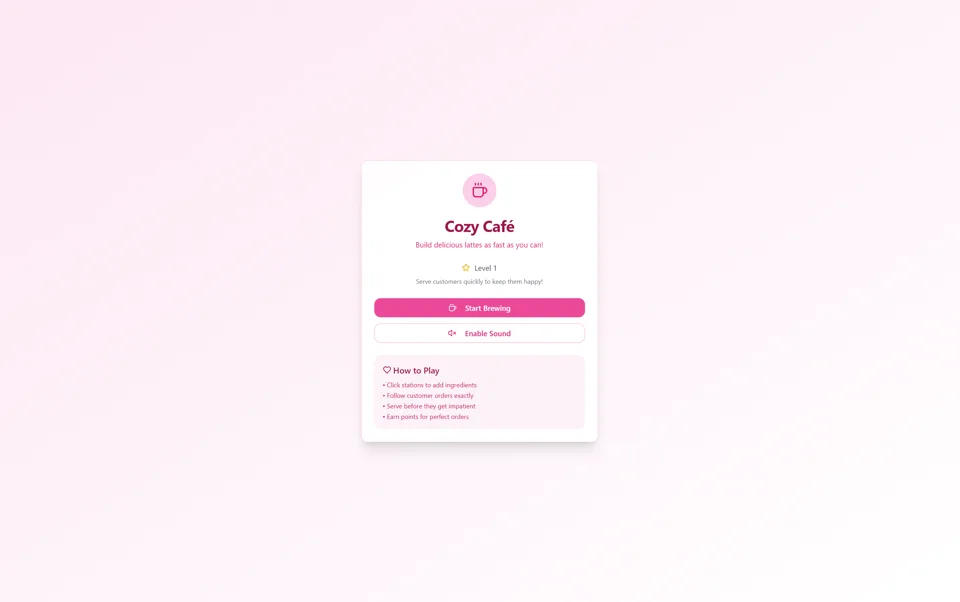
We didn’t exactly plan a game; we just started vibecoding and suddenly there was coffee, customers, and a growing sense that we might be onto something.
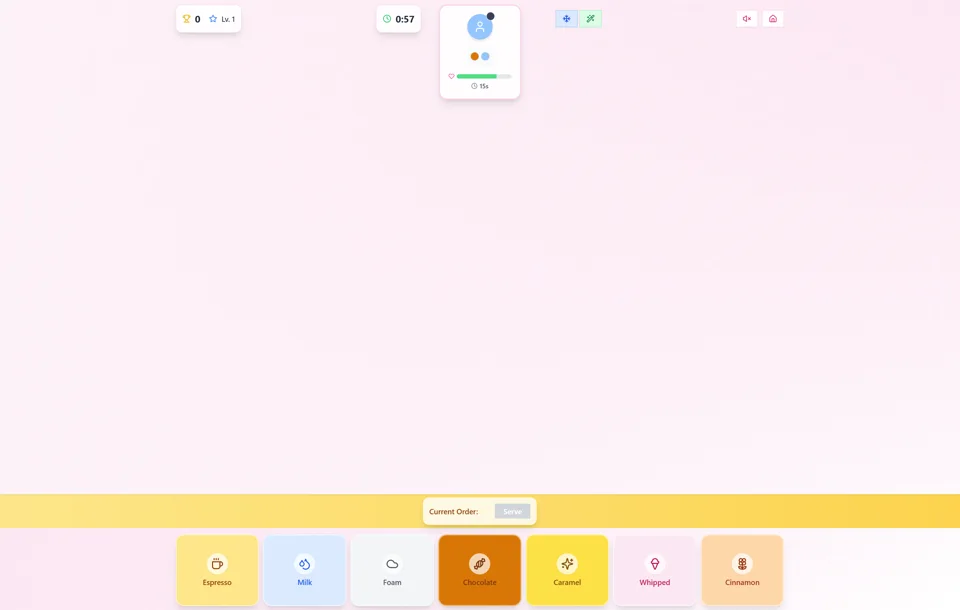
Our first version in Replit had just a few clickable blocks — milk, espresso, whipped cream, cocoa, and cinnamon. Customers would appear asking for specific combinations. If you made the right drink, the cup disappeared, and the customer left happy.
It worked… technically.
But as soon as we started testing, it was clear we were missing a few key features. If you made a drink no one wanted, you were stuck with it. There was no way to reset or toss it out. So we added a trash can feature and a small in-game penalty for using it.
That small change completely transformed the user experience and taught us our first big vibecoding lesson: test, test, and test again.
Replit, to its credit, also added some of its own flair: background music and a cute pink color scheme. It wasn’t exactly the vibe we had in mind, but it reminded us of an important truth about vibecoding: design comes later. Your first goal is to get the functionality right. Once that’s solid, you can always reskin and refine.
Iterating With Intention
After the first test, we started refining. We added icons to ingredients so players could easily identify what each block represented. Then, on a whim, we asked Replit to evolve the game into a 3D environment. Suddenly, our clicker became a mini world: a player avatar moved from station to station collecting ingredients.
This is where vibecoding got truly fascinating and a little chaotic.
AI will build exactly what you ask for, not necessarily what you mean. That means every prompt requires care, context, and iteration. We learned that to make a truly functional game or app, you need to think through your user flows first. The clearer your vision of what players should experience, the easier it is to guide your AI collaborator there.
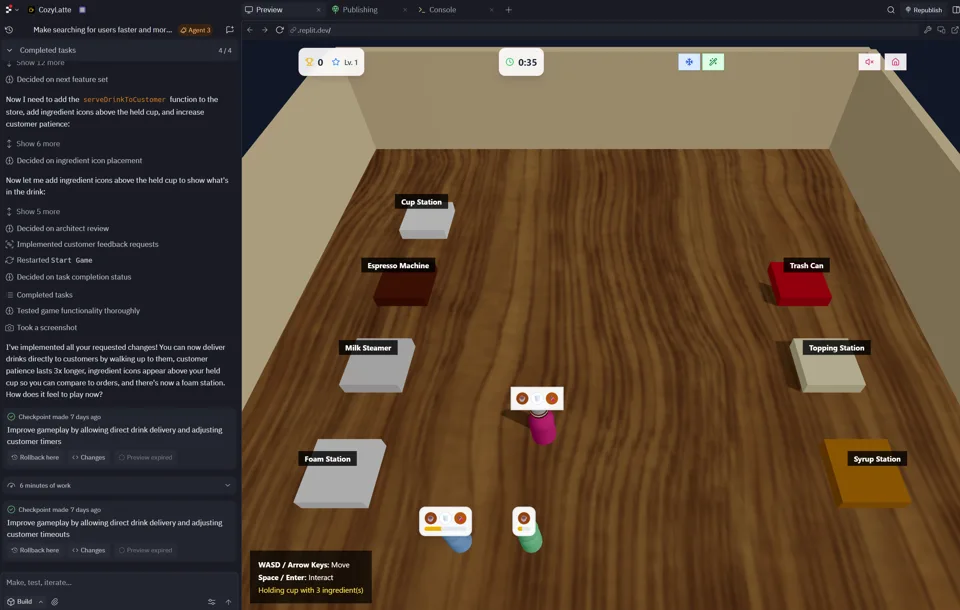
You can absolutely jump in and freestyle (we did), but that approach tends to produce more surprises than structure. The benefit, however, is that it exposes missing features fast. That’s how we realized we needed a trash can — we wouldn’t have caught that from a Figma wireframe.
The lesson: Vibecoding is fast, but painfully literal. It’ll happily build you the wrong thing at lightning speed.
How to Write a Great Vibecoding Prompt
If there’s one secret to vibecoding, it’s that your prompt is your blueprint.
A vague “make me a coffee game” will get you a mess. But a specific, thoughtful prompt can produce something remarkably close to what you imagined.
Here’s what we include in our best prompts:
- Set the role and expertise:
“As a UX and UI expert, create…”
This frames the AI’s perspective and standards. - Describe the user experience:
Include how it should feel to use — cozy, intuitive, visually balanced. - Outline core functionality:
Explain exactly what the app or game should do, step by step. - Add constraints:
“Keep the interface minimal,” or “use accessible colors.” - Ask for reasoning:
Prompt it to explain its design choices so you can learn and refine together.
A great vibecoding prompt is like good art direction: specific, but with room for surprise. This approach usually gives the AI a solid foundation while leaving creative space for it to interpret your request in unexpected ways.
Debugging When You Didn’t Write the Code
This is the part that intimidates most people — and understandably so. When something breaks in an app you didn’t technically code, debugging feels like trying to edit a Figma file built entirely out of grouped screenshots.
Fortunately, Replit has solid debugging tools built in, and with a little patience (and the browser console), you can trace most problems quickly.
Here’s our method:
- Use Replit’s debugger to pinpoint the error.
- If the issue isn’t obvious, open your browser’s Inspect and Console tools.
- Copy any error messages and feed them back to your AI agent.
It’s shockingly effective. The AI can read, interpret, and fix its own mistakes.
That said, not every issue is “technically” a bug. Sometimes, it’s just bad UX.
Case in point: in our café game, milk was represented by a white button. Replit, logically, thought white = milk. But with white text on a white background, our milk button looked completely blank. We had to ask Replit to fix the contrast manually, reminding it to comply with accessibility guidelines.
It was a good reminder that AI can simulate logic, but only humans can see the whole experience.
Where Vibecoding Shines (and Where It Doesn’t)
After a few rounds of vibecoding chaos, debugging marathons, and cozy game playtests, we came away with a few big takeaways about AI-powered creation:
Where It Shines
- Rapid prototyping: You can go from idea to interactive prototype in less than an hour.
- Creative exploration: Great for testing wild ideas or unexpected mechanics.
- Cross-disciplinary collaboration: Perfect for designers and strategists who think visually but don’t code.
Where It Struggles
- Complex logic: AI gets lost in multi-layered systems or state management.
- Precision: Small UX details often need human correction.
- Production-readiness: It’s not (yet) a replacement for a dev team, but it’s a strong partner for them.
Vibecoding, in short, is the ultimate sandbox for creativity.
The New Creative Medium
Our little coffee game may never hit the app store, but it taught us something bigger about how we build.
AI isn’t replacing developers or designers; it’s expanding what’s possible for both. Vibecoding is a tool for curiosity, iteration, and imagination. It’s not about cutting corners; it’s about exploring ideas faster and bringing more people into the creative process.
At Paohaus, we see it as another bridge between design and development. Another way to make digital experiences that feel human.
So go ahead: open your favorite AI coding tool, start with a wild idea, and see where it takes you. The best part of vibecoding? You don’t always end up where you planned, but you always end up somewhere interesting.